piątek, 28 czerwca 2013

Iceland in 10 days.

Couple days ago I have returned from 10 days trip to Iceland. These are my memories.

We have booked cheap flights from London Luton about 6 months before the set off. It costed about 120 EUR for a return ticket. We were also travelling from Poland, so there is another 120 EUR to get to UK. 

The whole trip was meant to be as cheap as possible. Sleeping at the airports, tents, hostels, eating tunas. Unfortunately it wasn't.

1000 ISK = 6,23 EUR

You can see the full photo album here

Day 1 (6.06.2013):


Our plane touched down in Keflavik (an airport city located about 50 km from capital). The whole airport was very elegant created in wooden style. There was no problem with charging electronic devices or exchanging money (it was difficult to get local currency in Europe). One way ticket to Reykjavik (with FlyBus - Iceland Excursions) costed about 2200 ISK, return - 4000 ISK. The bus was very convenient, equipped with free wifi. First impression was like - 'Where are trees? We are on a rock desert'. Weather was very cloudy and windy.

We got to Reykjavik and started to look for a place to sleep. Luckily a bus driver spotted that we were a little bit lost and told his friend to take us to the nearest hostel - Reykjavik Backpackers. One night in 8 person room costed about 3500 ISK (with your own sleeping bag). For a place in 6 person room we would have to pay 4000 ISK. The whole hostel has 4 floors, there is a kitchen on top, and a bar at the bottom. You can access free Internet on the two first floors.

After accommodating and leaving our things, we went off for a city trip. First we have located the cheapest mall - 'Bonus'. Prices were like 2 to 3 times more like those in central-eastern Europe. 

Bottle of Pepsi (1,5L) - 300 ISK
Toast bread - 200 ISK
Chicken fillet (1000 g) - 5000 ISK
Water (1,5L) - 200 ISK
Kebab - 1100 ISK

After shopping we started to ramble around the town. We visited the western part of the city - church on the hill, downtown, harbour.


Day 2 (7.06.2013):


We have asked some locals for the advice - where to go. They told us - Hveragerði (about 50km from Reykjavik). We have packed our bags, and go for a bus. First we had to got to Mjódd, and then change to another bus. From Monday to Friday vehicles shuttle every 2-3 hours.


When we got to the destination spot, a nice lady at gas station gave us a map and mark the worth-seeing spots. We wanted to swim in hot rivers. It was located in mountains about 8,5 km from our current location. There were some other attractions on our way there like the restaurant, where the meals were prepared on the heat coming from the earth.


You could see mini hot founts with boiling water


a lot of ranches


There was a medium difficulty track heading to the hot river.


Hot river was amazing. It was also very dangerous - you could got scorched. There were a lot of places where water was boiling.


It was also difficult to find a good area to relax in water. Finally we managed to get to the place where two streams were meeting and resulting in temperature like 30 to 40 celsius degrees. Water wasn't smelling very good (like an old egg) but it was such a pleasure to lie there after such a long walk.


We were chilling for about an hour when it started to rain. One guy told us, that there is no need to walk the same way down the mountain, because there is a road 2 km from here in the opposite direction. It was a big mistake that we believed him.

We walked about 4 km heading to the center of the mountains. Weather quickly got completely terrible, it was raining heavily, and very windy. I was wearing 3 jackets (2 of them were water-proof), hoodie, t-shirt and a shirt. Everything was entirely wet.

Our best guess at the moment was to pitch our tents. We found a tolerable place and did it in amazingly
fast time. We took everything off, clothed double pair of socks and got into the sleeping bags. Unluckily it wasn't that good. The wind was so strong that the tents were barely standing steady. Plus the stitches burst and the water was getting into. We decided to put stuff in one tent, went outside and sealed another with raincoat and both get into it. It helped a little, two sides were protected.


Day 3 (08.06.2013)


At about 3 A.M. we figured that there is no sense, and the weather probably won't change. Sleeping bags were almost completely wet, but we had to do something. Hard decision were made - we are popping wet clothes on and going down.

12 km later when we had spotted first houses, we decided to got inside one and ask for help. I was so chilled that I couldn't take of my bagpack or bend fingers. He let us dry clothes for about 30 minutes and gave us hot water - that helped us a lot.

The plan was to go to the nearest bus station, find a course to Mjódd and than to Reykjavik. But it started to rain again... First bus would pick us in next 40 minutes, we were tired, our clothes were still wet. I didn't want to spend next couple hours like this, I knew that I would get sick. We found a guest house here - in Hveragerði. 

Nice guy at the gas station gave us to addresses. First was closed, we stayed in the second one. Warmth was the reason why we did it with almost no hesitation. It costed us 6000 ISK per night, but it was worth. There were heaters everywhere plus we could store our things in the basement near the stoke.


Day 4 (09.06.2013)


After one day of regeneration we decided to save some money and get to the inner of the island hitch hiking. Locals told us that people are rather friendly, and we would have no problem. We set a course on Geysirs and Gullfoss (waterfall). It was about 100 km from our current location.

First target - Selfoss. Car stopped after 3 minutes of waiting. Driver was a pole, he was working for a fish factory and heading to work. He advised us that we must visit Blue Lagoon (we did it later).

He dropped us 20 minutes later. From now on we were following the route 35. There were a couple of cars that helped us - two young guys, one older architect from Reykjavik, woman who take care of horses... When we were about 30 km from Geysir a pair from L.A. California stopped to take us. They were heading directly to Gellfoss so we decied to go with them. Driver - Garret was a surfer, he told us that about 2 weeks ago he broke the world record on the highest wave to surf on - 30 meters. I have verified this


On the information walls it was written that Gullfoss was the second most beautiful waterfall on the world (after Niagara). It's total height is 32 m with 2 drops (the longest one is 21 m).


When we were finishing contemplating this nature phenomenon it started to rain again. It was sprinkling, and we wanted to get to the Gaysir also (about 7 km). There was a lot of tourists heading in this direction so we walk down the road for about 300 m and started to catch some cars. Unfortunately none was willing to help us. It started to rain heavily, so we went totally wet again. After running back to the Gullfoss Tourist Information we came to the idea, that we would ask people on the parking lot. That worked - few minutes later we were driving with a bunch of polish people.

We landed in Geysir, geothermal area with three active springs. The most famous - Strokkur explodes every 3-4 minutes ejecting water up to 30 m.


After watching some eruptions we decided to go back. We were standing by the road, sticking thumbs and watching tourist drivers passing us by. After 30 minutes we were so bored that we started to dance (listening to music on mobiles), than drivers from NYC stopped. We were very lucky, they took us back directly to Reykjavik. 

During our way back, we stopped near an inactive vulcano and took some photos.


60 minutes later we were in capital where we spend the night in hostel.

Day 5 (10.06.2013)


It was our day of regeneration. We have tasted some local beer near the harbour and visited the only museum on the world - Icelandic Phallological Museum. The collection of 280 specimens from 93 species of animals includes 55 penises taken from whales, 36 from seals and 118 from land mammals, allegedly including Huldufólk (Icelandic elves) and trolls.


Day 6 (11.06.2013)


We realized that it would be very hard to visit Iceland in a cheap, convenient and fast way. Therefore we decided to rent a car. At the beginning the plan was to take a trip around the island. We calculated that it is about 1500 km, so 500 km per day and 250 km per driver daily - quite easy. We rented small Hyundai i10, for three days it costed about 24 000 ISK (including extra insurance from damage coming from gravel roads).

We put all our stuff into trunk and set a course to Hveragerði. When we get there we did shopping that let us survive 3 days - toasted bread, pizza ham, toasted cheese, tuna etc. 

Roads in Iceland are almost perfect. There are empty, in very good state. Gas stations are about 50 km from each other. The landscape is outstanding. You can see views like rock desert, lava dust moon, huge glaciers, sheeps and horses farms, sea waves.

The weather is also very different. It can change from sunny sky to awful foggy rain within 20 minutes (especially in mountains).

There is one main round around the island. If you want to go inside, it's recommended to have a special off-road vehicle (like Monster Truck) with huge tires, there are a lot of those to rent. There are also a lot of camping sites, where you can pitch your tent. 


This day we have seen two waterfalls located about 50 km from each other. 

Here are some photos and video from the first one:


The second one is called Fimmvörðuháls and is located in southern Iceland. It was well prepared for tourists - paths for old people, camp site, restroom, and small truck where you can buy something to eat.


After admiring waterfalls we got into car and start driving to south-western part (Skaftafell) part of island. There road was straight for many kilometers. We were passing places that looked almost like the moon, there was lava dust everywhere. 


We tried to get as close to the glacier that it is possible (route 998). It was 9 pm when we parked our car near camping site, and decided to finish the rest of the way by foot. It was a mystery to us how far away it is to the glacier from our position. We could see it all the time, but it didn't get closer as we walked. The surface was all covered with rocks. At the beginning there were special paths for monster trucks, but as we went further they disappeared. Few hours later we realized that there is ice under our foot. It was very dirty, and we didn't recognize it earlier. 


It was quite dangerous there. There were big, collapsed ice hollows everywhere. One false move and you could get down forever :) We kept walking, visited some ice caves. It was such a great feeling, having many tonnes of water above head.  


One hour later we decided to get back. After a long walk we came to our Hyundai at about 2 am


Day 7 (12.06.2013)


After great night in car we decided to go further on the west. We were surprised that couple kilometers from our place, we found a tourist point, from where we could get to the glacier using many different path - depending on their difficulty. We decided to try the simplest one.


It was impossible to touch the ice due to the river, created by melting snow.

We drove a couple hours heading west. 

During the way, we stopped to see Ice Lagoon.


When we get to the Hornafjörður, we admitted that it's impossible to make 1,500 km in three days (because we already made more than 500 in 2 days), and decided to turn back to Reykjavik. 

Day 8 (13.06.2013)


That was our last day with car. First we wanted to see Hekla (biggest active volcano, 1,400m height). We got as close as we could, but we didn't see anything due to the fog. Going couple kilometers in one direction just to see it, also didn't sound good. We were afraid of getting wet.


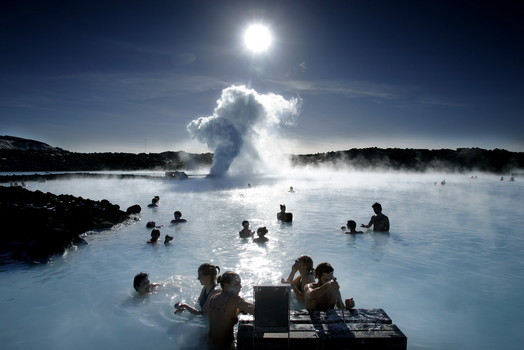
We reminded ourselves about Blue Lagoon. A famous place mentioned by the first pole that picked us up, when hitch-hiking. It was on the road from Reykjavik to Keflavik Airport, so we after swimming we could go back and prepare the car for the returning. We did so.

"The Blue Lagoon (Icelandic: Bláa lónið) geothermal spa is one of the most visited attractions in Iceland. The spa is located in a lava field in Grindavík on the Reykjanes Peninsula, southwestern Iceland. Bláa lónið is situated approximately 13 km (8 miles) from the Keflavík International Airport and 39 km (24 miles) from the capital city of Reykjavík. That is roughly a 20 minute drive from the airport and a 40 minute drive from Reykjavík.

The warm waters are rich in minerals like silica and sulphur and bathing in the Blue Lagoon is reputed to help some people suffering from skin diseases such as psoriasis.[1] The water temperature in the bathing and swimming area of the lagoon averages 37–39 °C (98–102 °F). The Blue Lagoon also operates a Research and Development facility to help find cures for other skin ailments using the mineral-rich water.

The lagoon is a man-made lagoon which is fed by the water output of the nearby geothermal power plant Svartsengi and is renewed every 2 days. Superheated water is vented from the ground near a lava flow and used to run turbines that generate electricity. After going through the turbines, the steam and hot water passes through a heat exchanger to provide heat for a municipal water heating system. Then the water is fed into the lagoon for recreational and medicinal users to bathe in."

Wikipedia


After swimming we came to Reykjavik, parked a car near cemetery and had a long walk before sleeping.


Day 9,10 (14-15.06.2013)


Two last days in Iceland we spent in it's capital. We didn't want to waste more money - so we kept relaxing. We were wandering through the city, drinking beers and talking to locals.


czwartek, 16 maja 2013

6 Useful IntelliJ Shortcuts

  1. CTRL + SHIFT + UP/DOWN ARROW
    Intelligent line copy
  2. CTRL + SHIFT + V
    Extended clipboard
  3. CTRL + ALT + B
    Go to method implementation
  4. CTRL + SHIFT + I
    See method definition without changing window
  5. CTRL + J
    Live templates. Generate code automatically.
  6. CTRL + E
    Recently opened files and views.

piątek, 22 marca 2013

JVM memory - loose speak

HEAP
  • young/new generation - includes new object space (Eden), and two survivor spaces.
    Eden - newly created objects are put here. Used to store objects with short time of life. 

    Survivor space -a pool containing objects that have survived 2-3 minor GC cleanings of the Eden space. If survivor spaces are too small the objects will be copied directly to old generation.
  • old/tenured generation. Larger than new generation, fills slower. 

PERM SPACE - contains meta data about classes and methods, String pool

STACK (LIFO) - store local variables and function calls. Lot lesser than heap space.
Each thread in Java has it's own stack. Object located in stack are visible only to it's thread. Objects put in heap are visible to all threads.

JVM arguments:
-Xms -> starting heap size
-Xmx -> maximum heap size
-Xmn -> size of new generation java heap space
-Xss -> thread stack size
-XX:MaxPermSize=256m -> max perm space size


Monitoring memory:
- jconsole
- jps and jstack


piątek, 2 listopada 2012

Linear programming optimal & cheap diet

Assuming we are having a list of 5 example products with it's nutrition facts, price and limitations of quantity we can eat:

name quantity protein carb fat price min max
rice \[p_1\] 100g 8.1g 80g 1g 0.5 2 4
buckwheat groats \[p_2\] 100g 12g 75g 2.7g 3.0 0 -
red beans \[p_3\] 30g 6.9g 18g 0.3g 0.36  0 3
mackerel \[p_4\] 100g 19g 0g 14g 6.15  0 1
fillet chicken \[p_5\] 100g 21g 0g 3.7g 1.6 2 -

Due to a specific diet we want to consume at least 190g of proteins and 280g carbs. Fat doesn't matter in this case. We also want to do it as cheap as possible.

Linear programming

First, we have to specify our objective function.

We are looking for the cheapest combination of all products, therefore we have to add their quantity multiplied by price together and minimalize it.

\[f = 0.5p_1+3p_2+0.36p_3+6.15p_4+1.6p_5 \to min\]
We also want to ensure that out target is included (proteins and carbs):
First row represents proteins in each product, second carbs, third fat.
 \begin{cases} 8.1p_{p_1} + 12p_{p_2} + 6.9p_{p_3} + 19p_{p_4}+ 21p_{p_5}\geqslant 190 \\ 80p_{c_1} + 75p_{c_2} + 18p_{c_3} + 0p_{c_4}+ 0p_{c_5} \geqslant 280 \\ 1p_{f_1} + 2.7p_{f_2} + 0.3p_{f_3} + 14p_{f_4}+ 3.7p_{f_5} \geqslant 0 \end{cases}
To make use of this equations we have to replace the greater than-equal siqn with less than-equal (multiply both sides by -1):

\begin{cases}  -8.1p_{p_1} - 12p_{p_2} - 6.9p_{p_3} - 19p_{p_4}- 21p_{p_5}\leqslant -190 \\ -80p_{c_1} - 75p_{c_2} - 18p_{c_3} - 0p_{c_4}- 0p_{c_5} \leqslant -280 \\ -1p_{f_1} - 2.7p_{f_2} - 0.3p_{f_3} - 14p_{f_4}- 3.7p_{f_5} \leqslant 0 \end{cases}

Remeber about min/max limitations per each product:

\begin{cases} 2 \leqslant p_1 \leqslant 4\\0 \leqslant p_2 \leqslant \infty \\0 \leqslant p_3 \leqslant 3 \\0 \leqslant p_4 \leqslant 1 \\2 \leqslant p_5 \leqslant \infty\end{cases}

Solve it

We will use Matlab's built-in function for solving such problems - linprog().
Will will have to provide arguments such as:

  • linear objective function vector (f)
  • matrix for linear inequality constraints (A)
  • vector for linear inequality constraints (b)
  • vector of lower bounds (lb)
  • vector of upper bounds (ub)

Based on the equations above:

 \[A = \begin{bmatrix} -8.1 & -12 & -6.9 & -19 & -21 \\ -80 & -75 & -18 & 0 & 0 \\-1 & -2.7 & -0.3 & -14 & -3.7 \end{bmatrix} b = \begin{bmatrix} -190 \\ -280 \\0 \end{bmatrix}\]

\[f = \begin{bmatrix} 0.5 \\ 3 \\0.36 \\ 6.15 \\1.6 \end{bmatrix} lb = \begin{bmatrix} 2 \\ 0 \\0 \\ 0 \\2 \end{bmatrix} ub = \begin{bmatrix} 4 \\ \infty \\3 \\ 1 \\\infty \end{bmatrix}\]

Finally - Matlab script:

f = [0.5 3 0.36 6.15 1.6]';
A = [-8.1   -12     -6.9    -19     -21;
     -80    -75     -18     0       0;
     -1     -2.7    -0.3    -14     -3.7];
b = [-190 -280 0]';
lb = [2 0 0 0 2]';
ub = [4 inf 3 1 inf]';

[x, fval] = linprog(f,A,b,[],[],lb,ub);

products_quantities = x
total_price = fval
nutritions = -A*x

And produced outcome:

products_quantities =

    4.0000
    0.0000
    3.0000
    0.0000
    6.5190

total_price =

   13.5105

nutritions =

  190.0000
  374.0000
   29.0205

That means that the most optimal option is to consume 400g of rice, 90g of beans and 650g of fillet chicken. We will pay about 13.5 for this meal and it will provide us 190g of proteins, 374g carbs and 29g of fat.

wtorek, 30 października 2012

Changing class during runtime in Java

Java class is consisting of  three elements:

package + class name + class loader instance

Using the same class loader to load the same class twice won't succeed.

Possible solution:
1. Write the interface for reloadable class (MyReloadableClass.interface)
2. Write the class that implements that interface (Changable.java)
3. Extend the default class loader class (MyClassLoader.java)
4. Write the method to verify the results (Runtime.java)

My implementation of class loader still needs some time to work on (hardcoded path, and class name), but it is proving that the code works fine.

com.interfaces.MyReloadableClass.interface
package com.interfaces;

public interface MyReloadableClass {
    public String getString();
}
com.oop.Changable.java
package com.oop;

import com.interfaces.MyReloadableClass;

public class Changable implements MyReloadableClass{
    public String getString() {
        return "test1";
    }
}
com.classLoaders.MyClassLoader
package com.classLoaders;

import java.io.ByteArrayOutputStream;
import java.io.InputStream;
import java.net.URL;
import java.net.URLConnection;

public class MyClassLoader extends ClassLoader {
    public MyClassLoader (ClassLoader parent) {
        super(parent);
    }

    public Class loadClass(String name) throws ClassNotFoundException {
        if (!"com.oop.Changable".equals(name))
            return super.loadClass(name);

        try {
            String url = "file:/home/khozzy/IdeaProjects/ReflectionProject/out/production/ReflectionProject/com/oop/Changable.class";
            URL myURL = new URL(url);
            URLConnection connection = myURL.openConnection();
            InputStream input = connection.getInputStream();
            ByteArrayOutputStream buffer = new ByteArrayOutputStream();
            int data = input.read();

            while (data != -1) {
                buffer.write(data);
                data = input.read();
            }

            input.close();

            byte[] classData = buffer.toByteArray();

            return defineClass("com.oop.Changable",classData,0, classData.length);

        } catch (Exception e) {
            e.printStackTrace();
        }
        return null;
    }

}
com.run.Runtime.java
package com.run;

import com.classLoaders.MyClassLoader;
import com.interfaces.MyReloadableClass;
import java.lang.reflect.InvocationTargetException;
import java.util.Scanner;

public class Runtime {
    public static void main(String[] args) {
        Scanner scanner = new Scanner(System.in);
        MyReloadableClass changableObj;

        ClassLoader parentClassLoader = MyClassLoader.class.getClassLoader();

        try {
            changableObj = (MyReloadableClass) getReloadedObject(parentClassLoader,"com.oop.Changable");
            System.out.println(changableObj.getString());

            System.out.println("Change and recompile source file, than press enter...");
            scanner.nextLine();

            changableObj = (MyReloadableClass) getReloadedObject(parentClassLoader,"com.oop.Changable");
            System.out.println(changableObj.getString());

        } catch (Exception e) {
            e.printStackTrace();
        }
    }

    private static Object getReloadedObject(ClassLoader parentClassLoader, String name) throws
            ClassNotFoundException,
            NoSuchMethodException,
            InvocationTargetException,
            IllegalAccessException,
            InstantiationException {

        return new MyClassLoader(parentClassLoader).loadClass(name).getConstructor().newInstance();
    }
}
Output:
test1
Change and recompile source file, than press enter...

(do some changes in Changes.java, recompile it than hit enter)
test2

MongoDB development replication-set how-to


I will describe how to configure and run a MongoDB (v2.0.6) replication set consisting of 3 nodes on localhost machine. For more informations (architecture, voting, etc.) please refer to http://www.mongodb.org/display/DOCS/Replica+Sets


1. Create necessary directories for each node

sudo mkdir -p /srv/mongodb/rs0-0
sudo mkdir -p /srv/mongodb/rs0-1
sudo mkdir -p /srv/mongodb/rs0-2


2. Create configuration files for each node

sudo touch /srv/mongodb/rs0-0/node0.conf
sudo touch /srv/mongodb/rs0-1/node1.conf
sudo touch /srv/mongodb/rs0-2/node2.conf


3. Edit each configuration file respectively:


3.1 node0.conf
# mongo.node0.conf
replSet=r0
logpath=node0.log
port = 27017
logappend=true
dbpath=/srv/mongodb/rs0-0
fork = true
rest = true

3.2 node1.conf
# mongo.node1.conf
replSet=r0
logpath=node1.log
port = 27018
logappend=true
dbpath=/srv/mongodb/rs0-1
fork = true
rest = true

3.3 node2.conf
# mongo.node2.conf
replSet=r0
logpath=node2.log
port = 27019
logappend=true
dbpath=/srv/mongodb/rs0-2
fork = true
rest = true

We are creating 3 nodes, each of them works on different port (27017, 27018, 27019), in the same replication set (r0), as a process (fork) with enabled logging and rest interface.


4. Create configuration for replication set

When initalizing a replication set all machines need to know about each others. I would create a text file in json style in main directory and later on copy it's contents to mongo console.

sudo touch /srv/mongodb/config

config = {_id: "r0", 
        members:[
                {_id: 0, host: '127.0.0.1:27017'},
                {_id: 1, host: '127.0.0.1:27018'},
                {_id: 2, host: '127.0.0.1:27019', priority: 0, slaveDelay: 60},
                ]
};

We are creating a new set (named r0) with an array of members. Notice that machine with id 2 works with delay (each operation will be executed with 60 seconds delay) therefore it cannot be elected as primary (priority to zero, necessary condition).


5. Run all nodes

Open 4 terminal windows. First three will represent nodes, the last one will be a mongo client used for establishing connections.

Terminals 1-3 (in directory /srv/mongodb/rs0-x):

sudo mongod -f node[x].conf
tail -f node[x].log

(where [x] stands for node number)


6. Connect to any node and initialize a replication set

In the last terminal type:

mongo localhost:27018 (port could be 27017 or 27019, it doesn't matter right now)

Copy and paste the contents of /srv/mongodb/config file formerly created - it will now become a json-style variable.

Then in console type:

> rs.initiate(config);

As an output you ought see:

{
"info" : "Config now saved locally.  Should come online in about a minute.",
"ok" : 1
}

From now, nodes started communicating to each other. You can see current state of the set by typing:

> rs.status()

{
"set" : "r0",
"date" : ISODate("2012-10-30T15:30:20Z"),
"myState" : 1,
"members" : [
{
"_id" : 0,
"name" : "127.0.0.1:27017",
"health" : 1,
"state" : 2,
"stateStr" : "SECONDARY",
"uptime" : 109,
"optime" : {
"t" : 1351610907000,
"i" : 1
},
"optimeDate" : ISODate("2012-10-30T15:28:27Z"),
"lastHeartbeat" : ISODate("2012-10-30T15:30:19Z"),
"pingMs" : 0
},
{
"_id" : 1,
"name" : "127.0.0.1:27018",
"health" : 1,
"state" : 1,
"stateStr" : "PRIMARY",
"optime" : {
"t" : 1351610907000,
"i" : 1
},
"optimeDate" : ISODate("2012-10-30T15:28:27Z"),
"self" : true
},
{
"_id" : 2,
"name" : "127.0.0.1:27019",
"health" : 1,
"state" : 2,
"stateStr" : "SECONDARY",
"uptime" : 111,
"optime" : {
"t" : 1351610907000,
"i" : 1
},
"optimeDate" : ISODate("2012-10-30T15:28:27Z"),
"lastHeartbeat" : ISODate("2012-10-30T15:30:19Z"),
"pingMs" : 0
}
],
"ok" : 1
}

We can see that all machines are up and in good condition. Node with id was chosen as a PRIMARY node (write/read permissions), while the others are in SECONDARY state.


7. Extras

7.1 Experiments
Experiment how nodes behave in certain situations:
- insert data into primary node, reconnect to other machine and check if it is still available
- insert data on secondary machine (tip. use slaveOk function) and check if it is available to other nodes
- break one node (ie. a safe way to disconnect slave node is to connect to that node and type

use admin
db.shutdownServer()

then reconnect to your primary node, load some data, after a while bring broken node back to live and try to observe the process of automatic recovery (rs.status())
- insert a large set of data, disconnect one node, ensure an index on some field (might take time), reconnect this node as a primary, than perform recovery

7.2 Web status
You can check current status of your set using web browser. Just type http://localhost:28017/_replSet

7.3 Production
Remeber that this configuration is for learning puroposes only. When using it on production always assure that each node is on different machine (or in cloud)

poniedziałek, 8 października 2012

How to change private variable in Java

Picture simple class

src/com/oop/Person.java
package com.oop;

public class Person {
    private String name;
    private String phone;

    public Person(String name, String phone) {
        this.name = name;
        this.phone = phone;
    }

    public String getName() {
        return name;
    }

    public String getPhone() {
        return phone;
    }

    public void setPhone(String phone) {
        this.phone = phone;
    }
}
There are two private fields - name and phone. Name can be only set using constructor. We cannot modify the private variable in classic way. This can be done using reflection.

src/com/run/Run.java
package com.run;

import java.lang.reflect.Field;
import java.lang.reflect.Method;

public class Run {
    public static void main(String[] args) {
        try {
            Class c1 = Class.forName("com.oop.Person");
            Object p1 = c1.getConstructor(String.class, String.class).newInstance("John", "3242342");
            Method m1 = c1.getDeclaredMethod("getName");

            Object result = m1.invoke(p1);
            System.out.println(result);

            Field nameField = c1.getDeclaredField("name");
            nameField.setAccessible(true);
            nameField.set(p1,"Derrek");

            result = m1.invoke(p1);
            System.out.println(result);

        } catch (Exception e) {
            System.out.println("Exception: " + e.toString());
        }
    }
}
Using getDeclaredField instead getField let us access private and protected variables. Setting accessible flag allows us to modify it. Finally the output looks like:
John
Derrek